Orbit: Difference between revisions
From Rise: The Vieneo Province
(Ticket 672: planning-only AUTO/ATM/SUB/ORB surface journeys driven by PASS; limits, execution inhibition, four labeled scenario renders; full client build pending) |
(Ticket 672: document DOR ALIGN, automatic pitch/yaw and horizon roll, RCS limits and manual takeover; add actual-code scenario 19, pending client rebuild.) |
||
| (4 intermediate revisions by the same user not shown) | |||
| Line 5: | Line 5: | ||
'''About the illustrations:''' These are labeled scenario renders from the implemented instrument's layout, orbital planner and guidance code, using synthetic example conditions. They are not screenshots of live flights. Each uses the native 420 × 320 layout enlarged for reading. Example times, fuel and delta-V are not a performance promise for your vehicle. | '''About the illustrations:''' These are labeled scenario renders from the implemented instrument's layout, orbital planner and guidance code, using synthetic example conditions. They are not screenshots of live flights. Each uses the native 420 × 320 layout enlarged for reading. Example times, fuel and delta-V are not a performance promise for your vehicle. | ||
'''Current limits:''' Orbital adjustment, rendezvous and overflight have executable plans. The new '''SURFACE PLAN''' revision adds planning-only ground-to-ground and surface-arrival comparisons using AUTO / ATM / SUB / ORB and PASS. It does not execute takeoff, atmospheric flight, reentry or landing, or automatically switch to another Autoflyte mode. This source revision has passed focused x64 tests; the full client rebuild and in-game verification remain deferred while flight testing continues. See [[#Surface journey planning|Surface journey planning]]. | '''Current limits:''' Orbital adjustment, rendezvous and overflight have executable plans. The new '''SURFACE PLAN''' revision adds planning-only ground-to-ground and surface-arrival comparisons using AUTO / ATM / SUB / ORB and PASS. It does not execute takeoff, atmospheric flight, reentry or landing, or automatically switch to another Autoflyte mode. The atmospheric-clearance revision also makes OVERFLY reject an approach or continuing orbit that fails its clearance checks and rechecks corrections during execution. This source revision has passed focused x64 tests; the full client rebuild and in-game verification remain deferred while flight testing continues. See [[#Surface journey planning|Surface journey planning]]. | ||
== Open and operate the page == | == Open and operate the page == | ||
'''Display-label revision:''' The latest source revision identifies the page as '''DOR''' at the upper left. While executing, '''EXEC''' at the upper right and the active phase ('''WAIT''', '''BURN''', '''COAST''' or '''ARRIVAL''') blink together: one second visible, one second hidden. The DOR page identifier, numerical readouts and | '''Display-label revision:''' The latest source revision identifies the page as '''DOR''' at the upper left. While executing, '''EXEC''' at the upper right and the active phase ('''ALIGN''', '''WAIT''', '''BURN''', '''COAST''' or '''ARRIVAL''') blink together: one second visible, one second hidden. The DOR page identifier, numerical readouts and atmospheric warnings stay steady. ESTIMATE, NO PLAN and completion/fault indications do not use this execution blink. | ||
''Full client build verification remains pending. New surface-planning captures show the DOR label; older orbital illustrations still show ORB1 and DOR-prefixed phases. Static illustrations do not demonstrate the execution blink.'' | ''Full client build verification remains pending. New surface-planning captures show the DOR label; older orbital illustrations still show ORB1 and DOR-prefixed phases. Static illustrations do not demonstrate the execution blink.'' | ||
| Line 76: | Line 76: | ||
| TP / nu || Orbital period in seconds / true anomaly in degrees, locating you around the current orbit relative to periapsis. | | TP / nu || Orbital period in seconds / true anomaly in degrees, locating you around the current orbit relative to periapsis. | ||
|- | |- | ||
| CURRENT > | | CURRENT > FINAL || Current AP/PE/e followed by the proposed final orbit after all burns. Older captures say CURRENT > PLAN. This is not the transfer minimum. CURRENT > REQUEST is an editable goal for which no valid plan exists yet. | ||
|- | |||
| MIN ROUTE ALT || Lowest checked planned-route altitude in km MSL above the spherical reference surface. Includes any waiting coast, transfer and continuing final orbit; an OVERFLY circularization check also includes its arrival-response allowance. This is separate from final PE and from the actual unpowered coast. | |||
|- | |- | ||
| B1 / B2 || Burn countdown, planned delta-V in m/s, estimated duration in seconds and fuel in kg. | | B1 / B2 || Burn countdown, planned delta-V in m/s, estimated duration in seconds and fuel in kg. | ||
| Line 84: | Line 86: | ||
| TO GO / USED || During DOR execution: the active guidance correction remaining, in m/s, and fuel consumed since engagement, in kg. | | TO GO / USED || During DOR execution: the active guidance correction remaining, in m/s, and fuel consumed since engagement, in kg. | ||
|} | |} | ||
=== Minimum route altitude === | |||
'''Pending display revision; focused x64 Release tests passed, full client build and live verification deferred.''' | |||
Read '''MIN ROUTE ALT''' directly below the graphic before engaging DOR. The graphic retains its size, and the OWN / TARGET / PLAN legend sits alongside the readout. It appears in every orbital view, including ascent detail when an orbital route is available. It uses the planner's checked arc minima, not the lowest vertex of the drawn curve. | |||
* '''Red''' means the planned minimum is below 100 km MSL. | |||
* '''Amber''' means the minimum is at least 100 km but the planned route has an atmospheric warning or is blocked by the clearance check. | |||
* Neutral gray is an unflagged estimate, not flight clearance. '''---''' means no checked route minimum is available; it never substitutes the final PE or current-coast minimum. | |||
'''CURRENT > FINAL''' distinguishes the destination AP/PE from this route minimum. A final PE of 118 km does not establish the approach's minimum altitude, and pressure warnings depend on air-relative speed as well as altitude. The latest source revision uses a 10 Pa advisory threshold; a 118 km orbit is not automatically atmospheric. Atmospheric and surface-planning policies remain those of the selected mode; this display change does not add a new restriction to RENDEZVOUS or ADJUST ORBIT. SURFACE PLAN keeps its separate phase legend and planning-only readouts. | |||
During EXEC the readout continues to describe the committed plan. Live '''ATM PASS''' warnings and retained DOR abort reasons can come from the measured coast or a rejected correction instead, so they need not agree with the planned minimum. A fresh preview after an abort shows the new plan; the old abort reason remains available independently. | |||
'''Finite-burn limitation:''' MIN ROUTE ALT is not a powered-flight simulation or an execution-readiness certificate. CORRECTION MARGIN LOST checks the actual unpowered coast over the remaining correction's estimated response interval, using the weakest translation axis. During a large reversal, a partially completed burn can make that coast intersect Vieneo even when the instantaneous-burn preview has a clear route. This display addition does not resolve that preview/execution feasibility mismatch; do not interpret a neutral minimum or final PE as assurance that DOR can finish the maneuver. | |||
[[File:Orbit-MFD-rendezvous-min-route-alt-20261016.png|thumb|center|600px|'''Scenario 18: route minimum and final orbit.''' Fresh labeled render from the actual planner/display code. This synthetic rendezvous has a final PE and route minimum both at 118 km. With the 10 Pa advisory threshold, its route minimum is neutral gray; LONG BURN - ESTIMATE and the independent reversal caution remain visible. This is not a live flight, a reconstruction of player telemetry or a guarantee of execution.]] | |||
<div style="clear:both"></div> | |||
=== Orbital direction cautions === | === Orbital direction cautions === | ||
| Line 92: | Line 112: | ||
* '''RETROGRADE / REVERSAL''' shows both conditions. An intermediate retrograde transfer still warns even if the final orbit returns to prograde. The committed plan retains its caution during execution. | * '''RETROGRADE / REVERSAL''' shows both conditions. An intermediate retrograde transfer still warns even if the final orbit returns to prograde. The committed plan retains its caution during execution. | ||
The OVERFLY automatic initial PASS search excludes plans that reverse orbital direction. Manual previews remain available with the caution | The OVERFLY automatic initial PASS search excludes plans that reverse orbital direction. Manual previews remain available with the caution. Direction caution alone does not block DOR, but the independent OVERFLY atmospheric-clearance requirements still apply. Blocked atmospheric previews retain their direction caution. If reversal was unintended, change the arrival/departure time or the overflight exit behavior and inspect the resulting plan before engaging DOR. A large delta-V can suggest reversal, but the warning is calculated from the trajectories rather than a speed threshold. | ||
[[ | See the updated blocked-overfly illustration under [[#Overfly atmospheric clearance|Overfly atmospheric clearance]]. It replaces the older example that allowed the same low-periapsis route as a warning-only plan. | ||
<div style="clear:both"></div> | <div style="clear:both"></div> | ||
| Line 110: | Line 130: | ||
For '''SURFACE PLAN''', the default view shows the estimated powered ascent as '''ASCENT / PLAN ONLY'''. Change VIEW to PLANE 3D, EDGE-ON or TRACK to inspect the entire journey before takeoff; changing VIEW does not change PASS. The local surface view rotates with the departure location, so a vertical climb is not mistaken for sideways travel caused by Vieneo's rotation. | For '''SURFACE PLAN''', the default view shows the estimated powered ascent as '''ASCENT / PLAN ONLY'''. Change VIEW to PLANE 3D, EDGE-ON or TRACK to inspect the entire journey before takeoff; changing VIEW does not change PASS. The local surface view rotates with the departure location, so a vertical climb is not mistaken for sideways travel caused by Vieneo's rotation. | ||
There is no hard atmospheric boundary at 75 or 100 km. The planner's warning estimate uses the client's density model and air-relative speed. The 100 km | There is no hard atmospheric boundary at 75 or 100 km. The planner's warning estimate uses the client's density model and air-relative speed. The 100 km ascent-view transition is a display rule. OVERFLY separately uses 100 km as a minimum clearance policy and also checks dynamic pressure; neither use defines a physical atmospheric boundary. | ||
== Change or circularize your orbit == | == Change or circularize your orbit == | ||
| Line 126: | Line 146: | ||
== Rendezvous with a station or spacecraft == | == Rendezvous with a station or spacecraft == | ||
'''10 Pa advisory revision (pending client rebuild):''' Orbital pressure advisories now trigger above '''10 Pa''', replacing 1 Pa. This operating tolerance applies consistently to current-coast, transfer, target and live DOR pressure checks, including OVERFLY's pressure criterion. [[YSP]] at 118 km produces approximately 6.3 Pa in the existing client density model, so its orbit alone no longer raises ATMOSPHERIC TARGET. The separate red below-100-km warning and OVERFLY minimum altitude still apply. Targets explicitly in atmospheric-flight reference mode still receive a target warning. Fuel, thrust, orbital-direction and finite-burn checks remain separate; this threshold change does not alter station fuel use or simulate heating. | |||
[[File:Orbit-MFD-plane-20261015.png|thumb|center|600px|'''Scenario 4: a station in a different plane.''' PLANE DIF is about 38°. The cyan orbit and amber transfer leave the green orbital plane; the station does not need to be directly overhead.]] | [[File:Orbit-MFD-plane-20261015.png|thumb|center|600px|'''Scenario 4: a station in a different plane.''' PLANE DIF is about 38°. The cyan orbit and amber transfer leave the green orbital plane; the station does not need to be directly overhead.]] | ||
# Select the target on the navigation/target instrument, then choose RENDEZVOUS here. | # Select the target on the navigation/target instrument, then choose RENDEZVOUS here. | ||
| Line 146: | Line 168: | ||
=== Follow DOR through the burns === | === Follow DOR through the burns === | ||
DOR follows the selected executable orbital plan. '''SURFACE PLAN cannot engage DOR''', even when a route says MODEL FIT; it supplies no actuator commands or automatic atmospheric handoff. For executable orbital plans, DOR | DOR follows the selected executable orbital plan. '''SURFACE PLAN cannot engage DOR''', even when a route says MODEL FIT; it supplies no actuator commands or automatic atmospheric handoff. '''Attitude-control revision (pending client rebuild and live flight verification):''' For executable orbital plans, DOR now steers pitch and yaw with rotational RCS, points the nose along the commanded burn direction for forward main-engine thrust, and rolls wings level relative to Vieneo's local horizon. The existing flight director receives the same pitch/heading targets and a level-roll reference; Orbit adds no separate attitude-command panel. Near a vertical burn, the horizon roll reference is ambiguous, so the controller preserves a stable roll orientation. DOR does not turn on the aircraft Autoflyte autopilot to do this. | ||
<gallery widths="420" heights="354" mode="traditional"> | <gallery widths="420" heights="354" mode="traditional"> | ||
File:Orbit-MFD-burn1-20261015.png|'''Scenario 5: departure, 30 seconds after engagement.''' DOR BURN; TO GO is about 487 m/s. The B1/B2 rows retain the planned burn budgets. | File:Orbit-MFD-burn1-20261015.png|'''Scenario 5: departure, 30 seconds after engagement.''' DOR BURN; TO GO is about 487 m/s. The B1/B2 rows retain the planned burn budgets. | ||
File:Orbit-MFD-coast-20261015.png|'''Scenario 6: the same transfer coasting.''' B1 is DONE. DOR COAST applies no thrust and prepares guidance for the next burn; TO GO now refers to that next correction. | File:Orbit-MFD-coast-20261015.png|'''Scenario 6: the same transfer coasting.''' B1 is DONE. DOR COAST applies no translation thrust and prepares guidance for the next burn; TO GO now refers to that next correction. | ||
File:Orbit-MFD-burn2-20261015.png|'''Scenario 7: arrival correction.''' DOR ARRIVAL has begun before the planned meeting time. Live TO GO differs from the original B2 estimate as guidance corrects the actual trajectory. | File:Orbit-MFD-burn2-20261015.png|'''Scenario 7: arrival correction.''' DOR ARRIVAL has begun before the planned meeting time. Live TO GO differs from the original B2 estimate as guidance corrects the actual trajectory. | ||
</gallery> | </gallery> | ||
For a delayed departure, ''' | [[File:Orbit-MFD-dor-align-20261016.png|thumb|center|600px|'''Scenario 19: ALIGN before thrust.''' A fresh, labeled scenario render from the actual executor, attitude controller and instrument drawing code, not a live client screenshot. DOR is engaged, EXEC and ALIGN are in their visible blink phase, and translation commands are held off while the ship turns. START NOW does not bypass alignment.]] | ||
'''ALIGN''' uses rotational RCS before allowing a burn. It captures within 2 degrees with total angular rate below 0.5 degree/second for at least half a second; more than 5 degrees of attitude error or 2 degrees/second of angular rate returns it to ALIGN. The commanded slew rate is limited to 5 degrees/second per body axis, with braking based on available torque. These are Rise control settings, not an Earth aircraft envelope. Small velocity trims below 2 m/s within the same burn phase retain the established nose direction instead of chasing a reversing near-zero vector; bounded translation controls handle those trims. | |||
The controller uses the vehicle's existing RCS force caps, inertia, lever arms, current mass, installed augmentation-system health, wing damage, electrical power and wear. Rotational effort consumes fuel through the existing propulsion model. DOR can use installed rotational RCS independently of the manual augmentation toggle and its IAS fade. It does not teleport attitude or grant extra torque. Main-engine spool-down and translation-RCS filtering still take time; holding commands off is not an instantaneous removal of residual thrust. Preview burn durations and fuel figures remain estimates and do not budget all alignment effort. | |||
For a delayed departure, DOR first aligns and then shows '''WAIT''' without translation thrust until departure. After the first burn, it aligns for the next burn and then shows '''COAST'''. Rotational RCS can remain active to hold attitude in WAIT and COAST. Reaching the scheduled burn time does not override an incomplete ALIGN. During active burns, remaining delta-V is recalculated from the actual state; it need not decrease smoothly or equal the original burn budget. Completion requires the controller to settle near its goal, so finite burns can finish later than the initial estimate. | |||
'''Correction-clearance revision (pending client build):''' DOR checks each proposed correction from the measured state instead of trusting the original plan's atmospheric flag. OVERFLY rechecks the remaining approach and continuing orbit, reduces optional position-closing commands that would spoil clearance, and does not select COAST solely because the remaining correction is small. It also checks the actual unpowered path over a conservative correction-response interval. Other orbital objectives retain their atmospheric-warning policy while checking surface clearance over the relevant approach or correction interval. | |||
If no qualifying correction exists, DOR clears its thrust and attitude commands, disconnects with the existing sound, and retains a reason such as '''DOR: NO CLEAR CORRECTION''', '''DOR: CORRECTION MARGIN LOST''', '''DOR: FINAL ORBIT UNSAFE''' or '''DOR: COAST CLEARANCE LOST'''. A delayed departure can report '''DOR: DEPARTURE COAST UNSAFE'''. Alignment also checks the measured unpowered path for the estimated turning time plus correction allowance: '''DOR: ALIGN MARGIN LOST''' means it cannot safely spend that time turning. OVERFLY retains its atmospheric-clearance requirement; other orbital objectives retain their existing surface-clearance checks and atmospheric cautions. '''DOR: NO ATTITUDE CONTROL''' means the attitude data or required rotational authority is unavailable. '''Disconnecting does not recover an unsafe trajectory.''' Inspect your actual PE and warnings, then take over or select a different valid recovery plan. | |||
Use DOR off to take over. Manual thrust-increase/decrease key commands also disengage it. Changing planning values, losing/changing a rendezvous target, losing cockpit power, docking/landing, or changing/resetting the vehicle's flight state cancels execution. After a cancellation, inspect the reason and solve again before re-engaging. VIEW changes alone are safe to make during execution. | Use DOR off to take over. Manual thrust-increase/decrease key commands also disengage it. With the attitude-control revision, a pitch, yaw or roll key command disconnects DOR immediately; a joystick pitch, roll or yaw deflection beyond 40% also disconnects it. Each uses the existing Autoflyte disconnect sound. Stale guidance, invalid control data and Flight Freeze suppress rotational commands. Normal control resumes through the existing manual controls after disconnect. Changing planning values, losing/changing a rendezvous target, losing cockpit power, docking/landing, or changing/resetting the vehicle's flight state cancels execution. After a cancellation, inspect the reason and solve again before re-engaging. VIEW changes alone are safe to make during execution. | ||
'''Disconnect sound update (pending client rebuild and in-game audio verification):''' Every transition from DOR on to off plays the existing Autoflyte disconnect sound once. This includes normal plan completion, automatic aborts, manual takeover, switching to [[TVM]], and a disconnect caused by loss of cockpit power. Completion and abort messages remain visible so you can inspect the reason. Remaining off does not repeat the sound, and restoring power does not replay it; engaging DOR again re-arms the next disconnect. This behavior follows DOR engagement, without an altitude or airspeed cutoff, and also applies in the simulator. Focused x64 tests cover the disconnect calls; the running client has not yet been rebuilt for this change. | '''Disconnect sound update (pending client rebuild and in-game audio verification):''' Every transition from DOR on to off plays the existing Autoflyte disconnect sound once. This includes normal plan completion, automatic aborts, manual takeover, switching to [[TVM]], and a disconnect caused by loss of cockpit power. Completion and abort messages remain visible so you can inspect the reason. Remaining off does not repeat the sound, and restoring power does not replay it; engaging DOR again re-arms the next disconnect. This behavior follows DOR engagement, without an altitude or airspeed cutoff, and also applies in the simulator. Focused x64 tests cover the disconnect calls; the running client has not yet been rebuilt for this change. | ||
| Line 169: | Line 201: | ||
'''Initial PASS-time revision (pending client build):''' On entering OVERFLY, the updated module searches for an early viable PASS time using the selected ALT, EXIT and START settings. It checks the route and continuing orbit against | '''Initial PASS-time revision (pending client build):''' On entering OVERFLY, the updated module searches for an early viable PASS time using the selected ALT, EXIT and START settings. It checks the route and continuing orbit against the OVERFLY clearance requirements below, available fuel and the preview's burn-duration limits. The direction-warning revision additionally excludes orbital reversals from automatic PASS suggestions. It searches up to six hours ahead in 30-second intervals, refines the first viable interval to one second, and adds up to 30 seconds of headroom when that later candidate also passes the checks. This is a useful starting estimate, not a guaranteed global minimum or a guarantee of flight performance. Very narrow windows can be missed. It does not minimize fuel. | ||
While searching, '''FINDING PASS TIME''' replaces the plan and DOR cannot engage it. '''NO VIABLE PASS IN 6H''' means no candidate met these criteria in the bounded search; it does not prove that no possible route exists. Change ALT, EXIT or START, or choose a manual PASS time to inspect other estimates. Weather at the selected point is not an input to the transfer solver. | While searching, '''FINDING PASS TIME''' replaces the plan and DOR cannot engage it. '''NO VIABLE PASS IN 6H''' means no candidate met these criteria in the bounded search; it does not prove that no possible route exists. Change ALT, EXIT or START, or choose a manual PASS time to inspect other estimates. Weather at the selected point is not an input to the transfer solver. | ||
| Line 175: | Line 207: | ||
The initial countdown stays fixed once selected. Until you edit PASS directly, changes to ALT, EXIT or START/IN request a new suggestion. After a direct PASS edit, your chosen deadline is retained, including an invalid or warning-producing one; the planner does not silently move it back into a valid window. Decrease or increase the displayed remaining time in five-minute steps (30 seconds to six hours). To request another automatic starting estimate, leave OVERFLY and select it again. VIEW changes do not restart the search. Automatic suggestions never change an executing DOR plan; manually changing planning values still cancels execution. | The initial countdown stays fixed once selected. Until you edit PASS directly, changes to ALT, EXIT or START/IN request a new suggestion. After a direct PASS edit, your chosen deadline is retained, including an invalid or warning-producing one; the planner does not silently move it back into a valid window. Decrease or increase the displayed remaining time in five-minute steps (30 seconds to six hours). To request another automatic starting estimate, leave OVERFLY and select it again. VIEW changes do not restart the search. Automatic suggestions never change an executing DOR plan; manually changing planning values still cancels execution. | ||
''The full x64 Release client build | ''The full x64 Release client build and in-game verification remain deferred while the current flight continues. The older illustration above demonstrates the layout, not automatic PASS initialization. The new clearance illustration below is a labeled code-generated scenario, not a live-flight capture.'' | ||
'''Why a low pass may have no clear transfer:''' | '''Why a low pass may have no clear transfer:''' Reaching 200 km above the point is not enough if the approach dips into the atmosphere or the continuing orbit returns there. EXIT COAST requires the full continuing orbit to remain bound and clear. EXIT CIRCULARIZE adds an arrival burn, but cannot make an earlier atmospheric dip acceptable. Changing PASS, ALT or EXIT may produce a valid route. Manual PASS retains your requested deadline and may display a blocked trajectory; it cannot override OVERFLY atmospheric clearance. Long-burn estimates can still be inspected manually. | ||
Overfly meets a moving ground location at a chosen time; it does not hover above it. A circularization burn belongs after the crossing and can change where the spacecraft travels afterward. The pass altitude is not clearance above local terrain. | Overfly meets a moving ground location at a chosen time; it does not hover above it. A circularization burn belongs after the crossing and can change where the spacecraft travels afterward. The pass altitude is not clearance above local terrain. | ||
<div style="clear:both"></div> | |||
=== Overfly atmospheric clearance === | |||
'''Pending source revision; full client build and live-flight verification remain outstanding.''' | |||
OVERFLY checks the waiting coast, approach to the waypoint and continuing orbit. Each must stay at or above '''100 km MSL''' and have a conservative dynamic-pressure bound of '''10 Pa or less'''. EXIT CIRCULARIZE also checks the unbraked arrival path over an estimated response interval before crediting the final circular orbit. A clear later circle does not excuse an earlier low pass. The solver prefers a qualifying transfer over a cheaper atmospheric alternative. | |||
The pressure estimate uses the client's 3.063 kg/m³ surface density, 7.5 km scale height and a conservative bound on air-relative speed at the lowest point of the checked arc. At orbital speed, this can require clearance higher than 100 km. These are operational planning checks, not a validated heating envelope, drag-integrated trajectory or guarantee of finite-burn performance. Vieneo's nitrogen/sulfur-dioxide/oxygen atmosphere is retained; no Earth heating coefficients or new atmospheric boundary are introduced. The published [[Vieneo]] scale-height discrepancy remains unchanged. | |||
'''ATM PASS <100km''' is red and steady when a proposed path, the current predicted coast, or live correction checking identifies a pass below 100 km. It can warn while your present altitude is much higher. The current-coast indication clears after the predicted minimum reaches 105 km, preventing flicker near the boundary; this display hysteresis does not relax the solver's 100 km limit. Ground/reset state clears stale orbital warnings. A pressure warning without a low pass stays amber. These indications remain visible during both EXEC blink phases and after an abort. | |||
A blocked preview shows '''NO PLAN''', '''ATM PASS - NO PLAN''' and '''MIN … km / BLOCKED''' where a rejected trajectory is available. DOR cannot engage that preview. Atmospheric penetration remains possible to display for other orbital objectives, and the atmospheric stages of SURFACE PLAN remain planning-only; this OVERFLY restriction is not a blanket exclusion of atmospheric flight or reentry. | |||
Cockpit '''Q''' is forward dynamic pressure in lb/ft²: Q = 2 is about 96 Pa, not 2 Pa. It is not a direct temperature or burn-up indication, and the planner's conservative arc-pressure bound is not the same as that instantaneous cockpit component. | |||
[[File:Orbit-MFD-overfly-clearance-blocked-20261016.png|thumb|center|600px|'''Scenario 17: atmospheric overfly blocked.''' Fresh labeled render from the actual planner and instrument code. A synthetic 905 km orbit requests a 200 km COAST pass in 180 minutes, but the candidate falls to 65.3 km. The red MIN ROUTE ALT 65.3km MSL, atmospheric warning and NO PLAN identify the rejection before engagement; the independent retrograde/reversal caution remains visible. This is not a live client screenshot or a reconstruction of player telemetry.]] | |||
<div style="clear:both"></div> | <div style="clear:both"></div> | ||
| Line 246: | Line 294: | ||
| LONG BURN - ESTIMATE / FINITE BURN NOT CORRECTED || The preview's instantaneous-burn approximation is weak for the estimated duration. Live DOR corrects from actual state, but the original time, path and fuel are estimates. | | LONG BURN - ESTIMATE / FINITE BURN NOT CORRECTED || The preview's instantaneous-burn approximation is weak for the estimated duration. Live DOR corrects from actual state, but the original time, path and fuel are estimates. | ||
|- | |- | ||
| ATMOSPHERIC PASS / ATMOSPHERIC TARGET || | | ATM PASS / ATMOSPHERIC PASS / ATMOSPHERIC TARGET || Pressure advisory above 10 Pa, or a target explicitly in atmospheric-flight reference mode. The actual predicted coast is refreshed during execution. Other orbital modes can retain atmospheric estimates; OVERFLY must satisfy its stricter clearance requirements. | ||
|- | |||
| ATM PASS <100km || Steady red low-pass warning for a planned or actual predicted trajectory, even before the vehicle descends. Current-coast warning clears at 105 km; this is annunciation hysteresis only. | |||
|- | |||
| ATM PASS - NO PLAN / MIN … km / BLOCKED || An inspectable OVERFLY candidate fails atmospheric clearance. Change PASS, ALT or EXIT; DOR cannot execute it. | |||
|- | |||
| DOR: NO CLEAR CORRECTION / CORRECTION MARGIN LOST / FINAL ORBIT UNSAFE / COAST CLEARANCE LOST / DEPARTURE COAST UNSAFE || Execution stopped because the updated trajectory or correction fails its checks. Thrust commands are cleared and the disconnect sounds once. The existing trajectory still needs pilot attention. | |||
|- | |- | ||
| SURFACE INTERSECTION / NO CLEAR TRANSFER || The requested shape intersects Vieneo, or no acceptable transfer was found. Raise the requested periapsis or change the timing/objective. | | SURFACE INTERSECTION / NO CLEAR TRANSFER || The requested shape intersects Vieneo, or no acceptable transfer was found. Raise the requested periapsis or change the timing/objective. | ||
Latest revision as of 17:32, 16 October 2026
The Orbit MFD shows your current trajectory, the selected target's trajectory, and a proposed maneuver around Vieneo. Use it to change your orbit, rendezvous with a station or another spacecraft, or pass over a selected surface point. DOR executes the selected valid orbital plan; circularizing is one possible plan.
This guide covers the new full-page instrument introduced by ticket 672. Older clients may still show the small numerical Orbit readout. The new page is installed in the E-10, E-11, P-13, W-6, T-19 and EVA displays. It is not installed in the A-4.
About the illustrations: These are labeled scenario renders from the implemented instrument's layout, orbital planner and guidance code, using synthetic example conditions. They are not screenshots of live flights. Each uses the native 420 × 320 layout enlarged for reading. Example times, fuel and delta-V are not a performance promise for your vehicle.
Current limits: Orbital adjustment, rendezvous and overflight have executable plans. The new SURFACE PLAN revision adds planning-only ground-to-ground and surface-arrival comparisons using AUTO / ATM / SUB / ORB and PASS. It does not execute takeoff, atmospheric flight, reentry or landing, or automatically switch to another Autoflyte mode. The atmospheric-clearance revision also makes OVERFLY reject an approach or continuing orbit that fails its clearance checks and rechecks corrections during execution. This source revision has passed focused x64 tests; the full client rebuild and in-game verification remain deferred while flight testing continues. See Surface journey planning.
Open and operate the page
Display-label revision: The latest source revision identifies the page as DOR at the upper left. While executing, EXEC at the upper right and the active phase (ALIGN, WAIT, BURN, COAST or ARRIVAL) blink together: one second visible, one second hidden. The DOR page identifier, numerical readouts and atmospheric warnings stay steady. ESTIMATE, NO PLAN and completion/fault indications do not use this execution blink.
Full client build verification remains pending. New surface-planning captures show the DOR label; older orbital illustrations still show ORB1 and DOR-prefixed phases. Static illustrations do not demonstrate the execution blink.
Select the Orbit page on a supported vehicle's MFD. Choose the station, spacecraft or surface waypoint on your usual target-selection instrument; Orbit reads that selection. You do not enter a second waypoint on this page.
| Control | Action |
|---|---|
| Shift + Up / Down | Select a row in the side controls. The highlighted row's actions appear along the bottom. |
| Shift + Left / Right | Change the highlighted option or decrease/increase its value. |
| Shift + C, with the eccentricity row selected | Request a circular orbit (e = 0). |
| Your configured DOR on/off control | Engage or disengage execution of a valid orbital plan. SURFACE PLAN is planning only and cannot engage DOR. |
The controls require cockpit power and do not take these keys while text entry is active. Changing VIEW does not alter the plan or interrupt DOR. Changing a planning value does interrupt execution: review the new solution before engaging DOR again.
Selecting Orbit does not replace or acknowledge EICAS indications. With EICAS powered and serviceable, its gear, engine, trim and crew-alert indications remain independent of the MFD page. If these disappear only while ORB1 is selected, that is a rendering fault, not evidence that the underlying condition has cleared.
Select an objective
| MODE | Use |
|---|---|
| RENDEZVOUS | An orbiting station or free-flying vessel is selected. Reach a future point on its trajectory and match its velocity there. |
| OVERFLY | A surface waypoint or grounded vessel is selected. Pass above that rotating ground point at the requested altitude and time. |
| SURFACE PLAN | A surface target is selected. Compare ideal atmospheric, suborbital and orbital journeys at a chosen PASS deadline. Planning only, including when starting in orbit. This replaces the former REENTRY placeholder in the pending source revision. |
| ADJUST ORBIT | Change your own orbit independently of the selected target. Available through MODE even when a target is selected. |
A newly selected surface target defaults to SURFACE PLAN in the pending revision (REENTRY in older clients). Use MODE to choose OVERFLY for an orbital pass instead. An explicitly selected ADJUST ORBIT objective remains independent of the target. The surface-mode cycle is SURFACE PLAN, OVERFLY, ADJUST ORBIT.
With no target, select ADJUST ORBIT or select a navigation target elsewhere. A docked or contained target is not treated as an independent free-flying spacecraft. An undocked spacecraft inside a station's reference bubble remains a valid target. An atmospheric-flight target may still have a predicted trajectory, but it is marked with an atmospheric warning.
Rendezvous is more than matching orbital size and shape. Two spacecraft can have identical orbital parameters and remain far apart. Rendezvous also solves for position and velocity at the same future time, including the difference between their orbital planes.
Read the picture and numbers
The graphic area stays the same size in every mode. Green is your current trajectory; cyan is the target; amber dashed lines show the proposed transfer. Dim amber shows the destination orbit, and gray dashed lines show a planned coast before departure. AP and PE mark apoapsis and periapsis. In orbital plans, numbered amber markers identify burns; T identifies the target's current position. Surface previews instead number phase boundaries and mark the future arrival point B; their legend explains the numbers.
| VIEW | What it helps you see |
|---|---|
| ORBIT | Your orbital plane viewed face-on: shape, apsides and transfer path. |
| PLANE 3D | Plane orientation, with Vieneo's equator and north axis as references. The NODE line indicates the intersection of the current and target orbital planes. |
| EDGE-ON | Your orbital plane viewed from its edge. Useful for seeing how far the target or transfer leaves that plane; it compresses the shape of your own orbit into a line. |
| TRACK | Latitude/longitude ground tracks, including Vieneo's rotation. Useful for a surface overflight. This is a schematic grid, not terrain imagery. |
| Readout | Meaning |
|---|---|
| AP / PE | Highest / lowest altitude of the orbit above the spherical Vieneo reference surface, in km. A negative PE means the unpowered trajectory intersects that surface. |
| e | Eccentricity: 0 is circular; larger values produce a more elongated ellipse. |
| SIZE … km a | Semi-major axis, measured from Vieneo's center. It is not altitude. The reference radius is 2939.6 km. |
| i / PLANE DIF | Inclination to Vieneo's equator, or the angle between your plane and the target's plane, in degrees. |
| TP / nu | Orbital period in seconds / true anomaly in degrees, locating you around the current orbit relative to periapsis. |
| CURRENT > FINAL | Current AP/PE/e followed by the proposed final orbit after all burns. Older captures say CURRENT > PLAN. This is not the transfer minimum. CURRENT > REQUEST is an editable goal for which no valid plan exists yet. |
| MIN ROUTE ALT | Lowest checked planned-route altitude in km MSL above the spherical reference surface. Includes any waiting coast, transfer and continuing final orbit; an OVERFLY circularization check also includes its arrival-response allowance. This is separate from final PE and from the actual unpowered coast. |
| B1 / B2 | Burn countdown, planned delta-V in m/s, estimated duration in seconds and fuel in kg. |
| TOTAL / FUEL | Total planned delta-V and estimated fuel. Duration and fuel assume the available full-thrust performance. |
| TO GO / USED | During DOR execution: the active guidance correction remaining, in m/s, and fuel consumed since engagement, in kg. |
Minimum route altitude
Pending display revision; focused x64 Release tests passed, full client build and live verification deferred.
Read MIN ROUTE ALT directly below the graphic before engaging DOR. The graphic retains its size, and the OWN / TARGET / PLAN legend sits alongside the readout. It appears in every orbital view, including ascent detail when an orbital route is available. It uses the planner's checked arc minima, not the lowest vertex of the drawn curve.
- Red means the planned minimum is below 100 km MSL.
- Amber means the minimum is at least 100 km but the planned route has an atmospheric warning or is blocked by the clearance check.
- Neutral gray is an unflagged estimate, not flight clearance. --- means no checked route minimum is available; it never substitutes the final PE or current-coast minimum.
CURRENT > FINAL distinguishes the destination AP/PE from this route minimum. A final PE of 118 km does not establish the approach's minimum altitude, and pressure warnings depend on air-relative speed as well as altitude. The latest source revision uses a 10 Pa advisory threshold; a 118 km orbit is not automatically atmospheric. Atmospheric and surface-planning policies remain those of the selected mode; this display change does not add a new restriction to RENDEZVOUS or ADJUST ORBIT. SURFACE PLAN keeps its separate phase legend and planning-only readouts.
During EXEC the readout continues to describe the committed plan. Live ATM PASS warnings and retained DOR abort reasons can come from the measured coast or a rejected correction instead, so they need not agree with the planned minimum. A fresh preview after an abort shows the new plan; the old abort reason remains available independently.
Finite-burn limitation: MIN ROUTE ALT is not a powered-flight simulation or an execution-readiness certificate. CORRECTION MARGIN LOST checks the actual unpowered coast over the remaining correction's estimated response interval, using the weakest translation axis. During a large reversal, a partially completed burn can make that coast intersect Vieneo even when the instantaneous-burn preview has a clear route. This display addition does not resolve that preview/execution feasibility mismatch; do not interpret a neutral minimum or final PE as assurance that DOR can finish the maneuver.

Orbital direction cautions
Direction-warning revision (pending client build): A steady amber caution beside the graphic's view title identifies the direction of the proposed plan. It remains visible during EXEC, including the hidden half of the execution blink, and does not replace atmospheric, fuel or finite-burn cautions.
- ORBIT REVERSAL means a departure or arrival burn changes the orbital angular-momentum direction by more than 90 degrees. It compares the directions before and after the burn; it is not based on which way the nose or thrust vector points. An ordinary backward braking burn that preserves orbital direction does not trigger it.
- RETROGRADE ORBIT means the transfer or final orbit runs against Vieneo's modeled rotation. A ship that already travels retrograde can keep that direction without an ORBIT REVERSAL. Polar motion alone is not classified as retrograde.
- RETROGRADE / REVERSAL shows both conditions. An intermediate retrograde transfer still warns even if the final orbit returns to prograde. The committed plan retains its caution during execution.
The OVERFLY automatic initial PASS search excludes plans that reverse orbital direction. Manual previews remain available with the caution. Direction caution alone does not block DOR, but the independent OVERFLY atmospheric-clearance requirements still apply. Blocked atmospheric previews retain their direction caution. If reversal was unintended, change the arrival/departure time or the overflight exit behavior and inspect the resulting plan before engaging DOR. A large delta-V can suggest reversal, but the warning is calculated from the trajectories rather than a speed threshold.
See the updated blocked-overfly illustration under Overfly atmospheric clearance. It replaces the older example that allowed the same low-periapsis route as a warning-only plan.
Ground and ascent
-
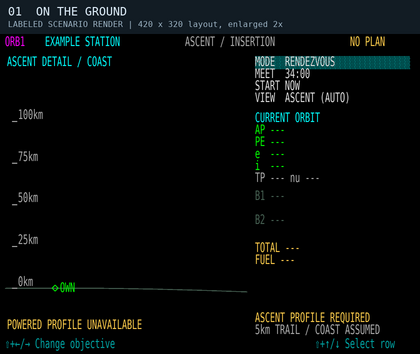
Scenario 1: on the ground. A station is selected, but there is no solved powered launch profile. Current orbital elements are unavailable.
-
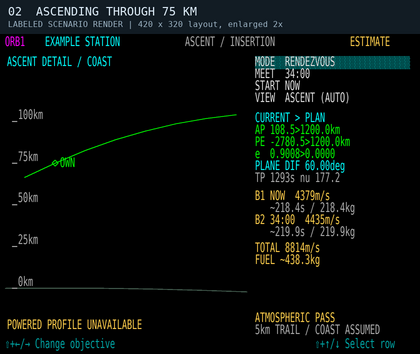
Scenario 2: ascending through 75 km. The green curve is a measured-state ballistic coast. An in-flight vacuum transfer estimate can appear, with an atmospheric warning; this is not a powered ascent profile.


For orbital objectives, on the ground or while rising below 100 km, the graphic automatically becomes ASCENT DETAIL / COAST. It shows the local curved surface and altitude scale. The header says ASCENT / INSERTION, while MODE still describes your chosen objective, such as RENDEZVOUS.
ASCENT PROFILE REQUIRED on the ground with an orbital objective means DOR cannot launch you using this planner. There is no optimized launch-window display or continuous heading/pitch schedule for takeoff. Fly the ascent using the vehicle's normal controls. Once airborne, any available transfer estimate starts from your measured position and velocity; it does not include aerodynamic lift or drag in the predicted path.
At 100 km while climbing, the graphic returns to the selected orbital view. This does not certify that you are in orbit: a trajectory whose periapsis intersects Vieneo remains ORBIT INSERTION or SUBORBITAL / ENTRY. A descending vehicle below 100 km is not automatically shown as ascending.
For SURFACE PLAN, the default view shows the estimated powered ascent as ASCENT / PLAN ONLY. Change VIEW to PLANE 3D, EDGE-ON or TRACK to inspect the entire journey before takeoff; changing VIEW does not change PASS. The local surface view rotates with the departure location, so a vertical climb is not mistaken for sideways travel caused by Vieneo's rotation.
There is no hard atmospheric boundary at 75 or 100 km. The planner's warning estimate uses the client's density model and air-relative speed. The 100 km ascent-view transition is a display rule. OVERFLY separately uses 100 km as a minimum clearance policy and also checks dynamic pressure; neither use defines a physical atmospheric boundary.
Change or circularize your orbit

- Select MODE → ADJUST ORBIT.
- Choose LOCK NONE, LOCK AP or LOCK PE. Locking an apsis preserves its selected radius while you change eccentricity. It does not mean “wait to burn at that apsis.”
- Change e. With LOCK NONE, also change SIZE. Shift+C on the e row requests a circle; without an apsis lock it uses the planned first-burn radius when available, otherwise your current radius.
- Choose the departure rule under START. Compare the green current orbit with the amber requested orbit, AP/PE, burn count, fuel and warnings.
- Engage DOR when satisfied with a valid plan, or use the plan as a reference for manual flying.
START NOW asks for a solution from your current position; you do not have to wait for apoapsis or periapsis. START AUTO compares a limited set of candidate departure times, including apsides for orbital adjustment, and chooses the lowest delta-V among valid candidates. It is not a search of every possible launch window. START AT TIME exposes an IN countdown that you can adjust.
If the requested orbit does not pass through the departure point, the planner may propose a transfer and a second burn to establish the new shape. A request that intersects the surface is rejected. SIZE changes in 100 km steps; e changes in 0.01 steps.
Rendezvous with a station or spacecraft
10 Pa advisory revision (pending client rebuild): Orbital pressure advisories now trigger above 10 Pa, replacing 1 Pa. This operating tolerance applies consistently to current-coast, transfer, target and live DOR pressure checks, including OVERFLY's pressure criterion. YSP at 118 km produces approximately 6.3 Pa in the existing client density model, so its orbit alone no longer raises ATMOSPHERIC TARGET. The separate red below-100-km warning and OVERFLY minimum altitude still apply. Targets explicitly in atmospheric-flight reference mode still receive a target warning. Fuel, thrust, orbital-direction and finite-burn checks remain separate; this threshold change does not alter station fuel use or simulate heating.

- Select the target on the navigation/target instrument, then choose RENDEZVOUS here.
- Set MEET to the desired future arrival time. Each adjustment changes the requested interval by five minutes and establishes a new countdown. In the pending PASS-time revision described below, this adjustment uses the remaining time currently shown, with limits of 30 seconds to six hours.
- Compare START NOW, AUTO or AT TIME. If no clear transfer is found, change the arrival or departure time.
- Use PLANE 3D or EDGE-ON to inspect the plane change, and ORBIT to inspect the transfer shape. Review both burns and the fuel estimate.
- Engage DOR to execute the selected solution. Continue monitoring the target and warnings.
The planned meeting point is approximately 5 km behind the target along its trajectory. It is a rendezvous staging point, not a docking port or a command to fly into the station's center. Stations follow their modeled motion. Another spacecraft is predicted to coast; if it maneuvers, the original prediction is no longer reliable.
After rendezvous, use the normal close-approach and docking procedures. The Orbit page does not obtain docking clearance or perform docking. TVM remains a separate target-relative velocity control.
Planning inside a station bubble

A station's nearby reference bubble is a coordinate frame used for smooth motion. Entering it does not mean the ship is docked. You can plan and execute orbital maneuvers while undocked inside it, and select another undocked spacecraft in a station bubble as a rendezvous target. Entering or leaving the bubble alone does not cancel DOR. Actual docking still blocks planning and cancels execution.
Orbit reconstructs a ship's state from the station's modeled instantaneous motion plus the ship's measured relative motion. This avoids the jumping orbital elements caused by subtracting two rounded station positions to estimate velocity. It applies regardless of whether the selected target is a station, a spacecraft or a ground point; no display smoothing delays the values.
Follow DOR through the burns
DOR follows the selected executable orbital plan. SURFACE PLAN cannot engage DOR, even when a route says MODEL FIT; it supplies no actuator commands or automatic atmospheric handoff. Attitude-control revision (pending client rebuild and live flight verification): For executable orbital plans, DOR now steers pitch and yaw with rotational RCS, points the nose along the commanded burn direction for forward main-engine thrust, and rolls wings level relative to Vieneo's local horizon. The existing flight director receives the same pitch/heading targets and a level-roll reference; Orbit adds no separate attitude-command panel. Near a vertical burn, the horizon roll reference is ambiguous, so the controller preserves a stable roll orientation. DOR does not turn on the aircraft Autoflyte autopilot to do this.
-
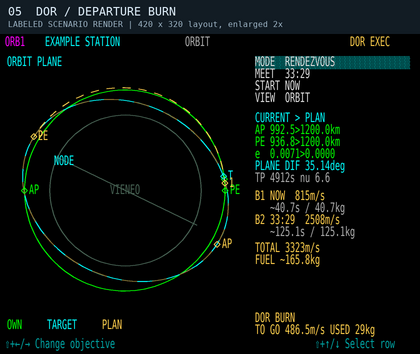
Scenario 5: departure, 30 seconds after engagement. DOR BURN; TO GO is about 487 m/s. The B1/B2 rows retain the planned burn budgets.
-
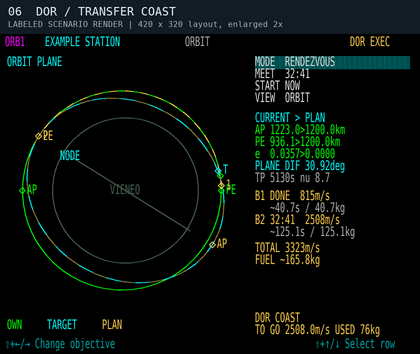
Scenario 6: the same transfer coasting. B1 is DONE. DOR COAST applies no translation thrust and prepares guidance for the next burn; TO GO now refers to that next correction.
-
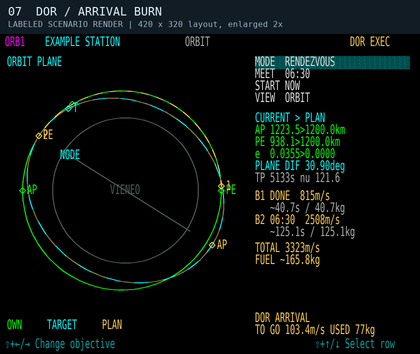
Scenario 7: arrival correction. DOR ARRIVAL has begun before the planned meeting time. Live TO GO differs from the original B2 estimate as guidance corrects the actual trajectory.


ALIGN uses rotational RCS before allowing a burn. It captures within 2 degrees with total angular rate below 0.5 degree/second for at least half a second; more than 5 degrees of attitude error or 2 degrees/second of angular rate returns it to ALIGN. The commanded slew rate is limited to 5 degrees/second per body axis, with braking based on available torque. These are Rise control settings, not an Earth aircraft envelope. Small velocity trims below 2 m/s within the same burn phase retain the established nose direction instead of chasing a reversing near-zero vector; bounded translation controls handle those trims.
The controller uses the vehicle's existing RCS force caps, inertia, lever arms, current mass, installed augmentation-system health, wing damage, electrical power and wear. Rotational effort consumes fuel through the existing propulsion model. DOR can use installed rotational RCS independently of the manual augmentation toggle and its IAS fade. It does not teleport attitude or grant extra torque. Main-engine spool-down and translation-RCS filtering still take time; holding commands off is not an instantaneous removal of residual thrust. Preview burn durations and fuel figures remain estimates and do not budget all alignment effort.
For a delayed departure, DOR first aligns and then shows WAIT without translation thrust until departure. After the first burn, it aligns for the next burn and then shows COAST. Rotational RCS can remain active to hold attitude in WAIT and COAST. Reaching the scheduled burn time does not override an incomplete ALIGN. During active burns, remaining delta-V is recalculated from the actual state; it need not decrease smoothly or equal the original burn budget. Completion requires the controller to settle near its goal, so finite burns can finish later than the initial estimate.
Correction-clearance revision (pending client build): DOR checks each proposed correction from the measured state instead of trusting the original plan's atmospheric flag. OVERFLY rechecks the remaining approach and continuing orbit, reduces optional position-closing commands that would spoil clearance, and does not select COAST solely because the remaining correction is small. It also checks the actual unpowered path over a conservative correction-response interval. Other orbital objectives retain their atmospheric-warning policy while checking surface clearance over the relevant approach or correction interval.
If no qualifying correction exists, DOR clears its thrust and attitude commands, disconnects with the existing sound, and retains a reason such as DOR: NO CLEAR CORRECTION, DOR: CORRECTION MARGIN LOST, DOR: FINAL ORBIT UNSAFE or DOR: COAST CLEARANCE LOST. A delayed departure can report DOR: DEPARTURE COAST UNSAFE. Alignment also checks the measured unpowered path for the estimated turning time plus correction allowance: DOR: ALIGN MARGIN LOST means it cannot safely spend that time turning. OVERFLY retains its atmospheric-clearance requirement; other orbital objectives retain their existing surface-clearance checks and atmospheric cautions. DOR: NO ATTITUDE CONTROL means the attitude data or required rotational authority is unavailable. Disconnecting does not recover an unsafe trajectory. Inspect your actual PE and warnings, then take over or select a different valid recovery plan.
Use DOR off to take over. Manual thrust-increase/decrease key commands also disengage it. With the attitude-control revision, a pitch, yaw or roll key command disconnects DOR immediately; a joystick pitch, roll or yaw deflection beyond 40% also disconnects it. Each uses the existing Autoflyte disconnect sound. Stale guidance, invalid control data and Flight Freeze suppress rotational commands. Normal control resumes through the existing manual controls after disconnect. Changing planning values, losing/changing a rendezvous target, losing cockpit power, docking/landing, or changing/resetting the vehicle's flight state cancels execution. After a cancellation, inspect the reason and solve again before re-engaging. VIEW changes alone are safe to make during execution.
Disconnect sound update (pending client rebuild and in-game audio verification): Every transition from DOR on to off plays the existing Autoflyte disconnect sound once. This includes normal plan completion, automatic aborts, manual takeover, switching to TVM, and a disconnect caused by loss of cockpit power. Completion and abort messages remain visible so you can inspect the reason. Remaining off does not repeat the sound, and restoring power does not replay it; engaging DOR again re-arms the next disconnect. This behavior follows DOR engagement, without an altitude or airspeed cutoff, and also applies in the simulator. Focused x64 tests cover the disconnect calls; the running client has not yet been rebuilt for this change.
Pass over a ground point

- Select a surface waypoint, then choose OVERFLY.
- Set ALT above the spherical reference surface, in 100 km steps, and PASS time, in five-minute steps.
- Select EXIT COAST to continue on the transfer orbit after the crossing, or EXIT CIRCULARIZE to establish a circular orbit after passing the waypoint.
- Set START, inspect the ground track and orbit views, and review the burn estimates before using DOR.
Initial PASS-time revision (pending client build): On entering OVERFLY, the updated module searches for an early viable PASS time using the selected ALT, EXIT and START settings. It checks the route and continuing orbit against the OVERFLY clearance requirements below, available fuel and the preview's burn-duration limits. The direction-warning revision additionally excludes orbital reversals from automatic PASS suggestions. It searches up to six hours ahead in 30-second intervals, refines the first viable interval to one second, and adds up to 30 seconds of headroom when that later candidate also passes the checks. This is a useful starting estimate, not a guaranteed global minimum or a guarantee of flight performance. Very narrow windows can be missed. It does not minimize fuel.
While searching, FINDING PASS TIME replaces the plan and DOR cannot engage it. NO VIABLE PASS IN 6H means no candidate met these criteria in the bounded search; it does not prove that no possible route exists. Change ALT, EXIT or START, or choose a manual PASS time to inspect other estimates. Weather at the selected point is not an input to the transfer solver.
The initial countdown stays fixed once selected. Until you edit PASS directly, changes to ALT, EXIT or START/IN request a new suggestion. After a direct PASS edit, your chosen deadline is retained, including an invalid or warning-producing one; the planner does not silently move it back into a valid window. Decrease or increase the displayed remaining time in five-minute steps (30 seconds to six hours). To request another automatic starting estimate, leave OVERFLY and select it again. VIEW changes do not restart the search. Automatic suggestions never change an executing DOR plan; manually changing planning values still cancels execution.
The full x64 Release client build and in-game verification remain deferred while the current flight continues. The older illustration above demonstrates the layout, not automatic PASS initialization. The new clearance illustration below is a labeled code-generated scenario, not a live-flight capture.
Why a low pass may have no clear transfer: Reaching 200 km above the point is not enough if the approach dips into the atmosphere or the continuing orbit returns there. EXIT COAST requires the full continuing orbit to remain bound and clear. EXIT CIRCULARIZE adds an arrival burn, but cannot make an earlier atmospheric dip acceptable. Changing PASS, ALT or EXIT may produce a valid route. Manual PASS retains your requested deadline and may display a blocked trajectory; it cannot override OVERFLY atmospheric clearance. Long-burn estimates can still be inspected manually.
Overfly meets a moving ground location at a chosen time; it does not hover above it. A circularization burn belongs after the crossing and can change where the spacecraft travels afterward. The pass altitude is not clearance above local terrain.
Overfly atmospheric clearance
Pending source revision; full client build and live-flight verification remain outstanding.
OVERFLY checks the waiting coast, approach to the waypoint and continuing orbit. Each must stay at or above 100 km MSL and have a conservative dynamic-pressure bound of 10 Pa or less. EXIT CIRCULARIZE also checks the unbraked arrival path over an estimated response interval before crediting the final circular orbit. A clear later circle does not excuse an earlier low pass. The solver prefers a qualifying transfer over a cheaper atmospheric alternative.
The pressure estimate uses the client's 3.063 kg/m³ surface density, 7.5 km scale height and a conservative bound on air-relative speed at the lowest point of the checked arc. At orbital speed, this can require clearance higher than 100 km. These are operational planning checks, not a validated heating envelope, drag-integrated trajectory or guarantee of finite-burn performance. Vieneo's nitrogen/sulfur-dioxide/oxygen atmosphere is retained; no Earth heating coefficients or new atmospheric boundary are introduced. The published Vieneo scale-height discrepancy remains unchanged.
ATM PASS <100km is red and steady when a proposed path, the current predicted coast, or live correction checking identifies a pass below 100 km. It can warn while your present altitude is much higher. The current-coast indication clears after the predicted minimum reaches 105 km, preventing flicker near the boundary; this display hysteresis does not relax the solver's 100 km limit. Ground/reset state clears stale orbital warnings. A pressure warning without a low pass stays amber. These indications remain visible during both EXEC blink phases and after an abort.
A blocked preview shows NO PLAN, ATM PASS - NO PLAN and MIN … km / BLOCKED where a rejected trajectory is available. DOR cannot engage that preview. Atmospheric penetration remains possible to display for other orbital objectives, and the atmospheric stages of SURFACE PLAN remain planning-only; this OVERFLY restriction is not a blanket exclusion of atmospheric flight or reentry.
Cockpit Q is forward dynamic pressure in lb/ft²: Q = 2 is about 96 Pa, not 2 Pa. It is not a direct temperature or burn-up indication, and the planner's conservative arc-pressure bound is not the same as that instantaneous cockpit component.

Surface journey planning
Planning-only revision, pending full client rebuild and in-game verification. Select point B on the normal target instrument. On this page choose MODE SURFACE PLAN, then ROUTE and PASS. The same controls work on the ground and while airborne; actual docking blocks planning.
| ROUTE | Proposed profile |
|---|---|
| AUTO | Compare the three route families at the selected PASS. Choose the lowest estimated fuel among candidates that pass the simplified model checks. AUTO may choose a different family when PASS changes. |
| ATM | A powered atmospheric profile, climbing to 20 km MSL, traversing toward B, then descending. Only offered for departures at or below 40 km in this initial model. It is not a simulation of wing-borne cruise. |
| SUB | Powered climb and boost, a ballistic coast with a surface-intersecting osculating orbit, then powered braking and descent. The coast ends before the intersection. |
| ORB | Powered climb and boost, a circular coast nominally at 400 km MSL, then powered braking and descent. This need not complete a revolution. |
PASS is the requested arrival countdown, not an AUTO preference switch. Adjust it in five-minute steps using the remaining time shown (30 seconds to six hours). The comparison shows each family's estimated fuel and MODEL FIT, THRUST LIMIT, FUEL LIMIT, IAS LIMIT or another reason. A forced ATM/SUB/ORB choice is retained even when invalid; AUTO does not silently replace it. If nothing fits, AUTO can display an invalid candidate for inspection. Longer times are not guaranteed to help: gravity support consumes fuel and the search covers only a limited family of profiles.
On first selecting this objective, the module searches for an initial model-fitting PASS up to six hours ahead: two-minute trial spacing, ten-second refinement of the first fitting bracket, and up to 30 seconds of headroom if that candidate also fits. FINDING INITIAL PASS identifies the search; NO FITTING PASS IN 6H means this bounded search found none, not that every possible trajectory is impossible. A manual PASS edit keeps your deadline, including an invalid one. Changing ROUTE requests a new suggestion only before PASS has been edited manually. Leaving and reselecting SURFACE PLAN restarts automatic initialization. The search never rewrites an executing orbital plan.
The amber path joins the measured initial state to B's position at PASS, accounting for Vieneo's rotation. PLANE 3D and TRACK can show the whole journey even before takeoff. For space profiles, markers 1–4 indicate the end of climb, start of coast, start of braking and start of descent/entry; B is the future destination. These are preview phase boundaries, not flight-director commands. ATM has only its final B marker. The top flight-phase label describes your current state, independently of the proposed route.
| Surface readout | Meaning |
|---|---|
| RANGE | Current great-circle distance to B, in km; not full path length. |
| TOP | Highest sampled profile altitude, km MSL above the spherical reference surface. |
| TOTAL | Integrated powered acceleration, expressed as delta-V in m/s, including gravity support and modeled body drag. This can greatly exceed the vehicle's speed; it is not a cruise-speed command. |
| FUEL | Estimated kg for the selected ideal profile, including idle flow during coasts. |
| THRUST | Peak fraction of available main-engine thrust; over 100% fails the model check. |
| MAX q | Highest sampled dynamic pressure in kPa, based on mass density and air-relative speed. It is informational, not a validated heating or structural limit. |
MODEL FIT is not flight clearance. The preview uses Vieneo gravity and rotation, the client's 3.063 kg/m³ surface density and 7.5 km density scale height, vehicle main thrust, altitude efficiency, fuel flow, wear and empirical body drag. The Vieneo wiki publishes a different scale height (6.923 km); this change preserves the client model. Cruise at 20 km, the 100 km powered-segment interface and nominal 400 km orbital coast are planning choices, not atmospheric boundaries.
The powered segments assume ideal thrust direction. They do not simulate RCS-axis limits, vehicle attitude changes, spool response, wing lift, wing/tail/wave drag, wind, clouds, weather avoidance, heating or terrain. ATM supports weight with thrust, so its fuel estimate is not a prediction of ordinary wing-borne Autoflyte cruise. Sampled geometry checks a reference sphere; it does not establish terrain clearance or that point B is a suitable landing site. Fuel comparisons and AUTO's choice are therefore comparisons within this simplified model, not a global optimum or a recommendation to fly the displayed path. Direction reversals remain visibly cautioned.
PLAN ONLY / ATM HANDOFF means the atmospheric stages require separate pilot/Autoflyte operation. No automatic mode handoff, takeoff, atmospheric guidance, reentry control, hover or landing is implemented. The end-state is an ideal planning endpoint at B, not a landing command. Pressing DOR on a surface preview leaves execution off. Existing executable ADJUST ORBIT, RENDEZVOUS and OVERFLY plans remain separate.
-
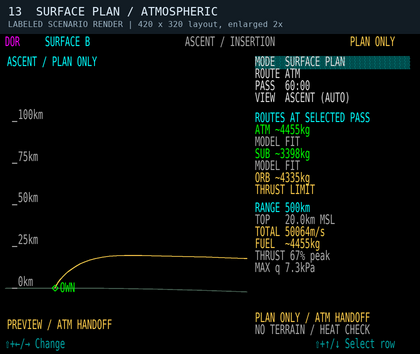
Scenario 13: ATM, 500 km in 60 minutes. Local ascent preview and route comparison. The large TOTAL includes ideal powered gravity support. Labeled synthetic render, not a live flight.
-
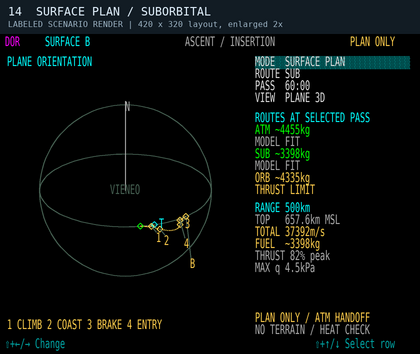
Scenario 14: SUB at the same PASS. Whole-route PLANE 3D view while still on the ground, with ballistic coast and numbered phase boundaries. Labeled synthetic render.
-
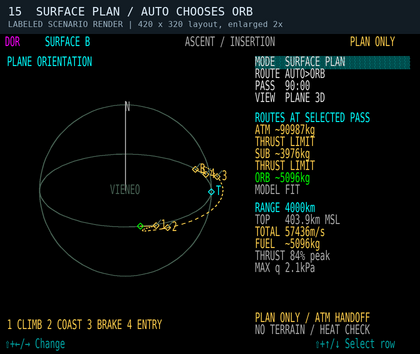
Scenario 15: AUTO, 4000 km in 90 minutes. ORB fits the simplified model while ATM and SUB exceed thrust. This demonstrates the PASS constraint, not certified flight performance. Labeled synthetic render.


Reentry and atmospheric entry
Select the intended ground waypoint and use SURFACE PLAN to compare an ideal surface-arrival preview from the measured airborne state. Direct ATM cruise reports ENTRY FIRST when the departure exceeds its model range. SUB and ORB include powered braking and descent; an inefficient or reversing candidate may be the only model fit at a selected PASS. Review its warnings and limitations. Do not use this preview as a safe entry corridor or expect DOR to execute it.

ADJUST ORBIT remains an orbital tool: a requested final orbit that intersects the spherical surface is rejected. Atmospheric flight, return and landing still use the vehicle's separate controls and procedures. The surface preview does not decide whether arrival should end in hover or touchdown.
| Message | Meaning / next action |
|---|---|
| VACUUM ESTIMATE | An orbital estimate is available. It assumes two-body coasting between instantaneous planned burns. |
| LONG BURN - ESTIMATE / FINITE BURN NOT CORRECTED | The preview's instantaneous-burn approximation is weak for the estimated duration. Live DOR corrects from actual state, but the original time, path and fuel are estimates. |
| ATM PASS / ATMOSPHERIC PASS / ATMOSPHERIC TARGET | Pressure advisory above 10 Pa, or a target explicitly in atmospheric-flight reference mode. The actual predicted coast is refreshed during execution. Other orbital modes can retain atmospheric estimates; OVERFLY must satisfy its stricter clearance requirements. |
| ATM PASS <100km | Steady red low-pass warning for a planned or actual predicted trajectory, even before the vehicle descends. Current-coast warning clears at 105 km; this is annunciation hysteresis only. |
| ATM PASS - NO PLAN / MIN … km / BLOCKED | An inspectable OVERFLY candidate fails atmospheric clearance. Change PASS, ALT or EXIT; DOR cannot execute it. |
| DOR: NO CLEAR CORRECTION / CORRECTION MARGIN LOST / FINAL ORBIT UNSAFE / COAST CLEARANCE LOST / DEPARTURE COAST UNSAFE | Execution stopped because the updated trajectory or correction fails its checks. Thrust commands are cleared and the disconnect sounds once. The existing trajectory still needs pilot attention. |
| SURFACE INTERSECTION / NO CLEAR TRANSFER | The requested shape intersects Vieneo, or no acceptable transfer was found. Raise the requested periapsis or change the timing/objective. |
| INSUFFICIENT FUEL / PERFORMANCE UNAVAILABLE | Fuel or propulsion data do not support execution. A geometric estimate alone is not an executable DOR plan. |
| BURN TIME PASSED / ARRIVAL TIME PASSED | The selected deadline has passed. Edit the time to request a new one; these are real countdowns, not indefinitely rolling delays. |
| SELECT NAV TARGET / NO TARGET TRAJECTORY | Select a usable target, or choose ADJUST ORBIT. |
| UNDOCK TO PLAN / POWER OFF | Restore the required flight or cockpit-power state before planning/execution. |
| ASCENT PROFILE REQUIRED | No executable powered launch solution for the selected orbital objective. |
| PLAN ONLY / ATM HANDOFF | Surface preview only. DOR cannot execute it or automatically transfer control to atmospheric Autoflyte. |
| MODEL FIT / THRUST LIMIT / FUEL LIMIT / IAS LIMIT | Result of the surface preview’s simplified checks. MODEL FIT does not certify terrain, heating, weather, maneuverability or landing. |
| NO TERRAIN / HEAT CHECK | Explicit reminder that the surface preview omits these checks. |
| ENTRY FIRST / NO ROUTE AT THIS PASS | Direct ATM is outside its initial departure-height range, or no candidate was available at this deadline. Change ROUTE/PASS or use separate entry procedures. |